1 You may find your mobile phone is flooded with text messages one day. Painfully, you are not in a position to delete those beloved messages either because they are funny jokes or important messages. Then you need text message backup to get rid of the storage runout.
2 Lost your mobile phone? Mobile system crashed? Or mobile phone being stolen or robbed? No one ever expects that, but it does happen on somebody. Maybe next one is you. Why not cautiously have a backup for your text messages in advance?
3 Get lengthy text messages to read or to edit and send to others? It is really burdensome to do it on that small screen and tiny keyboard. By using a text message backup software, you can do them all on your computer which is more comfortable for you.
4 Have you got some messages that are of emotional significance with your family, your boyfriend or girlfriend, or someone special to your life ? It is suggested that you make a backup and print it out, which will be more convenient for you to read later.
5 If you are a salesman or a businessman, and some communications or exchanges happen to be made over text messages. It is urgent to make a backup of the information. Because it can be very valuable and fatal once it is lost.
6 While using a mobile call recorder to make an electronic call diary becomes more and more popular, have you ever considered making a text message diary, just image what an amazing thing it would be when you read over those messages that draw a picture of your past days.

2010年4月26日星期一
GodswMobile updated its SMS Transfer to V 2.1
SMS Transfer, which is an application designed for cell phones running Microsoft Windows Mobile 5 or Windows Mobile 6 system, allows you to transfer and backup your SMS messages between mobile phone and desktop computer.
Thanks to its simplicity and great practicality, SMS Transfer has received great applause from customers since its first appearance to the market.
In response to the request of our customers, we have updated SMS Transfer to V2.1. Mainly, we have added the following new functions while maintained other basic functions.
• View and edit exported text message on PC
• Copy and paste your exported SMS
• Export SMS to TXT file on PC
• Support VGA and WVGA Screen (eg. HTC Touch HD/2 and Diamond/2)
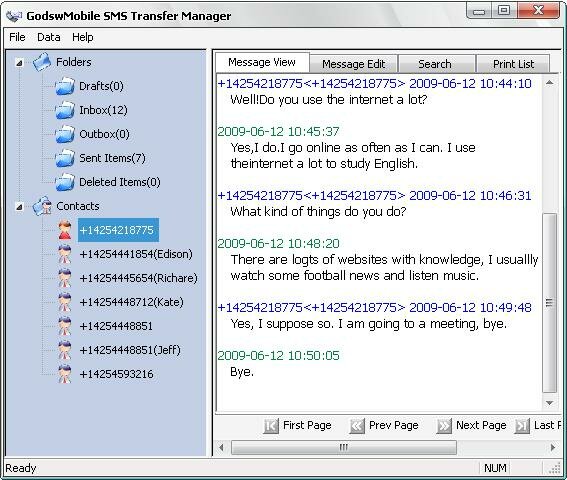
These newly added features will enable you to see and edit SMS messages in a text file on your computer. So you can make possible changes to your SMS messages and backup what you really want and edit or delete what you don’t want to backup. Besides, SMS Transfer 2.1 now support VGA and WVGA screen, so you don’t have to worry about using it on your latest HTC mobile phones.
Thanks to its simplicity and great practicality, SMS Transfer has received great applause from customers since its first appearance to the market.
In response to the request of our customers, we have updated SMS Transfer to V2.1. Mainly, we have added the following new functions while maintained other basic functions.
• View and edit exported text message on PC
• Copy and paste your exported SMS
• Export SMS to TXT file on PC
• Support VGA and WVGA Screen (eg. HTC Touch HD/2 and Diamond/2)
These newly added features will enable you to see and edit SMS messages in a text file on your computer. So you can make possible changes to your SMS messages and backup what you really want and edit or delete what you don’t want to backup. Besides, SMS Transfer 2.1 now support VGA and WVGA screen, so you don’t have to worry about using it on your latest HTC mobile phones.
订阅:
博文 (Atom)