1 You may find your mobile phone is flooded with text messages one day. Painfully, you are not in a position to delete those beloved messages either because they are funny jokes or important messages. Then you need text message backup to get rid of the storage runout.
2 Lost your mobile phone? Mobile system crashed? Or mobile phone being stolen or robbed? No one ever expects that, but it does happen on somebody. Maybe next one is you. Why not cautiously have a backup for your text messages in advance?
3 Get lengthy text messages to read or to edit and send to others? It is really burdensome to do it on that small screen and tiny keyboard. By using a text message backup software, you can do them all on your computer which is more comfortable for you.
4 Have you got some messages that are of emotional significance with your family, your boyfriend or girlfriend, or someone special to your life ? It is suggested that you make a backup and print it out, which will be more convenient for you to read later.
5 If you are a salesman or a businessman, and some communications or exchanges happen to be made over text messages. It is urgent to make a backup of the information. Because it can be very valuable and fatal once it is lost.
6 While using a mobile call recorder to make an electronic call diary becomes more and more popular, have you ever considered making a text message diary, just image what an amazing thing it would be when you read over those messages that draw a picture of your past days.

2010年4月26日星期一
GodswMobile updated its SMS Transfer to V 2.1
SMS Transfer, which is an application designed for cell phones running Microsoft Windows Mobile 5 or Windows Mobile 6 system, allows you to transfer and backup your SMS messages between mobile phone and desktop computer.
Thanks to its simplicity and great practicality, SMS Transfer has received great applause from customers since its first appearance to the market.
In response to the request of our customers, we have updated SMS Transfer to V2.1. Mainly, we have added the following new functions while maintained other basic functions.
• View and edit exported text message on PC
• Copy and paste your exported SMS
• Export SMS to TXT file on PC
• Support VGA and WVGA Screen (eg. HTC Touch HD/2 and Diamond/2)
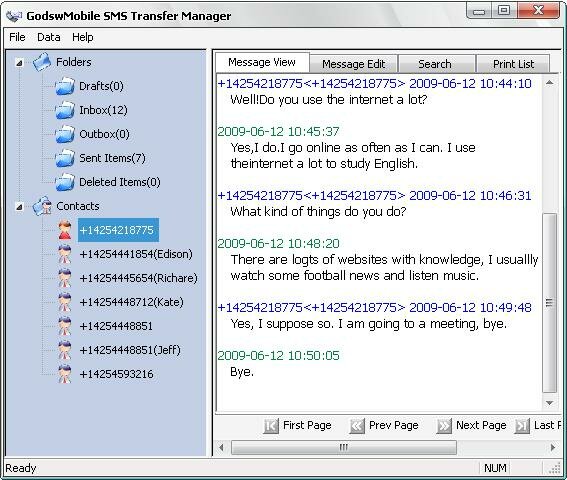
These newly added features will enable you to see and edit SMS messages in a text file on your computer. So you can make possible changes to your SMS messages and backup what you really want and edit or delete what you don’t want to backup. Besides, SMS Transfer 2.1 now support VGA and WVGA screen, so you don’t have to worry about using it on your latest HTC mobile phones.
Thanks to its simplicity and great practicality, SMS Transfer has received great applause from customers since its first appearance to the market.
In response to the request of our customers, we have updated SMS Transfer to V2.1. Mainly, we have added the following new functions while maintained other basic functions.
• View and edit exported text message on PC
• Copy and paste your exported SMS
• Export SMS to TXT file on PC
• Support VGA and WVGA Screen (eg. HTC Touch HD/2 and Diamond/2)
These newly added features will enable you to see and edit SMS messages in a text file on your computer. So you can make possible changes to your SMS messages and backup what you really want and edit or delete what you don’t want to backup. Besides, SMS Transfer 2.1 now support VGA and WVGA screen, so you don’t have to worry about using it on your latest HTC mobile phones.
2009年7月16日星期四
Restore SMS to Windows Mobile
Here is a step by step guide for you to restore sms to Windows Mobile Phone.
Before backup, the mobile phone do not have any messages as a brand new phone.

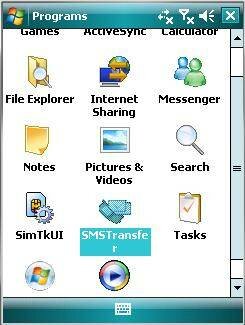
Step 1: Click on "SMS Transfer" in programs list to run it.
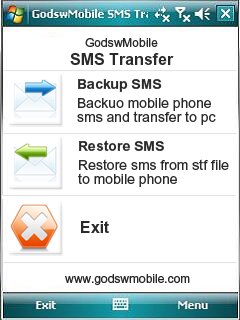
Step 2: Click on "Restore Messages" in the main interface to save your SMS messages into mobile phone.
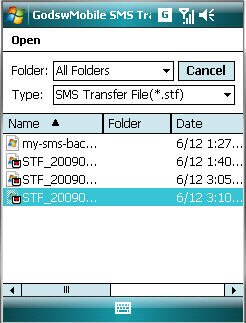
Before backup, the mobile phone do not have any messages as a brand new phone.
Step 1: Click on "SMS Transfer" in programs list to run it.
Step 2: Click on "Restore Messages" in the main interface to save your SMS messages into mobile phone.
Step 3: Select and click on the stf file to be restored.
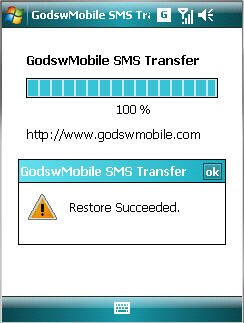
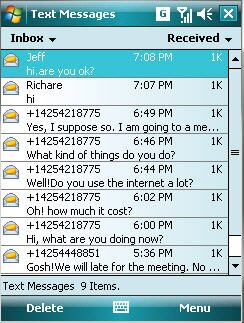
After Restore Succeed. You will see all you message come back to your phone now!

2009年7月13日星期一
Backup text message for Windows Mobile
Do you have a lot of SMS messages, some of importance? Do you need to backup your SMS from your phone to pc? Here is a full solution for you to transfer sms from Windows Mobile Phone to your desktop computer.
Step1: Download the SMS Transfer Tool ;
Step 2: Unzip the file you downloaded just now and copy the installation file "GodswMobileSMSTransferSetup.CAB" to your mobile device. You may need to connect your device to a host computer using ActiveSync. You can also transfer the file using a memory card.
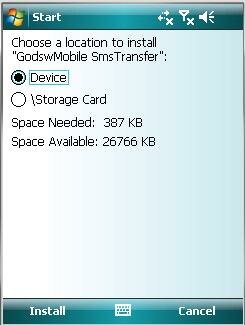
Step 3: On your device, navigate to the location of the CAB file using File Explorer. Click on the CAB file (displayed as the following screenshot) and click "Install" to begin the installation.
Step 4:Now installation completes. Select "OK" to continue.
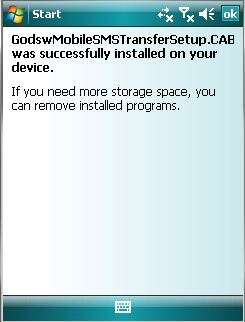
Install Completed
Now let’s use the software to finish the transfer job.
Step 5: Click "start" and then select programs. You will see the follow screen.
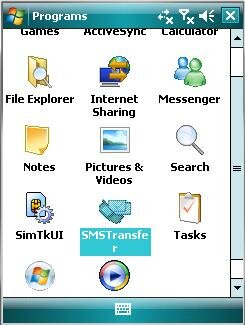
Step 6: Select the "SMSTransfer" in your mobile programs list to run it. You will see the follow screenshot.
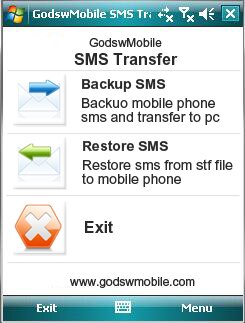
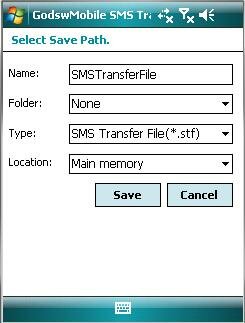
Step 7: Click on "Backup Messages" in the main interface to backup you SMS messages in mobile phone. You will see the follow screenshot.
Step1: Download the SMS Transfer Tool ;
Step 2: Unzip the file you downloaded just now and copy the installation file "GodswMobileSMSTransferSetup.CAB" to your mobile device. You may need to connect your device to a host computer using ActiveSync. You can also transfer the file using a memory card.
Step 3: On your device, navigate to the location of the CAB file using File Explorer. Click on the CAB file (displayed as the following screenshot) and click "Install" to begin the installation.
Step 4:Now installation completes. Select "OK" to continue.
Install Completed
Now let’s use the software to finish the transfer job.
Step 5: Click "start" and then select programs. You will see the follow screen.
Step 6: Select the "SMSTransfer" in your mobile programs list to run it. You will see the follow screenshot.
Step 7: Click on "Backup Messages" in the main interface to backup you SMS messages in mobile phone. You will see the follow screenshot.
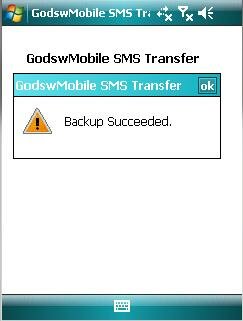
Step 8: Decide the file name, file format and location (The default setting is OK) for your SMS file and click on "Save" to start to backup process. You will see the follow screenshot.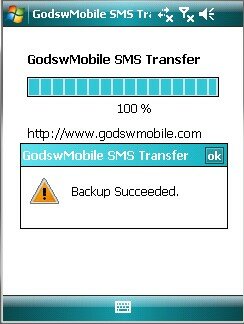
Step 9: After backup completes, all the SMS messages has been backup in a file on your phone. You can save it in your memory card or transfer it to your computer easily by ActiveSync.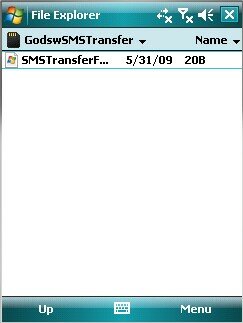
Backup SMS Completed
Download the SMS Transfer Tool for Windows Mobile Now!
Note: The trial version of Godsw SMS Transfer could only transfer 20 sms, to get the full version, please click HERE
Godsw Mobile SMS Transfer 2.0 Released
If you have many important SMS, unfortunately, at the same moment you need to hardset your cell phone or for some other reasons you have to transfer all your SMS. Don't warry. “GodswMobile sms transfer” helps you to transfer all your important and favorite SMS to your pc within 2 minutes. It can both run on Microsoft Windows Mobile 5.0 and 6.0 system
Backup your sms as a txt file
Using this software you can backup your SMS to a txt file which can read by both pc and other cellphones.
Support unlimited SMS backup/restore
Don't worry that you have too many SMS to backup. No matter how many SMS your cellphone has.GodswMobile SMS transfer can backup and restore unlimited SMS and contacts.
Easy to use
Some softwares are excellent but hard to manage.Peple always puzzle with these kind of software. Don't worry GodswMobile sms transfer is too complex to use. It supports customized transfer and very easy for you to manage.
Fully support Windows Mobile 5 and 6
This software can support cellphone both on windows mobile 5 and 6.You can backup the WM5 cellphone and then restore to both WM5 and WM6 cellphone.Also, you can backup WM6 cellphone then restore to both WM5 and WM6 cellphone.
ScreenShots:

Directly Download Link:http://www.godswmobile.com/download.html
For more information please visit at http://www.godswmobile.com
Backup your sms as a txt file
Using this software you can backup your SMS to a txt file which can read by both pc and other cellphones.
Support unlimited SMS backup/restore
Don't worry that you have too many SMS to backup. No matter how many SMS your cellphone has.GodswMobile SMS transfer can backup and restore unlimited SMS and contacts.
Easy to use
Some softwares are excellent but hard to manage.Peple always puzzle with these kind of software. Don't worry GodswMobile sms transfer is too complex to use. It supports customized transfer and very easy for you to manage.
Fully support Windows Mobile 5 and 6
This software can support cellphone both on windows mobile 5 and 6.You can backup the WM5 cellphone and then restore to both WM5 and WM6 cellphone.Also, you can backup WM6 cellphone then restore to both WM5 and WM6 cellphone.
ScreenShots:
Directly Download Link:http://www.godswmobile.com/download.html
For more information please visit at http://www.godswmobile.com
订阅:
博文 (Atom)